Add some fields to the view
- Our new View needs some data to display or it's not going to be very useful, so first we need to select the fields that will be incorporated into the View. Click the + symbol by Fields in the middle column.
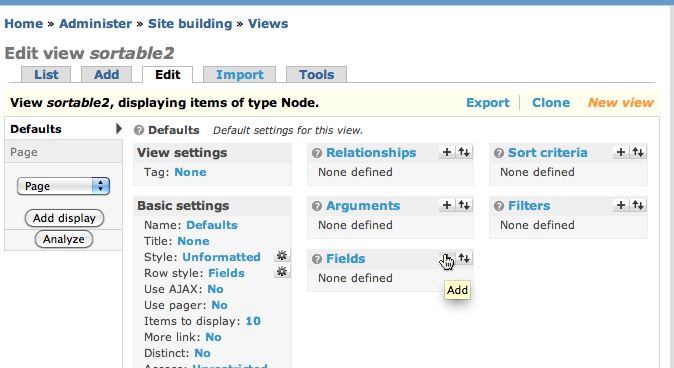
- You'll see a very long list of all the fields available to be used by a View. Fortunately you can filter the list to make it easier to find the fields you want.
Select NODE from the Groups menu.

- Check the boxes beside Node: Body and Node: Edit link
Click Add.
- Click the + symbol next to Fields again. Select Taxonomy: All terms. This means we want to list all taxonomy terms associated with the node.
Click Add.
Continue to next section "Part 3 of 8" =>
Ads by Google
Ads by Google
Posted by ellen at November 13, 2009 02:53 PM

